This generator uses data from Les Chroniques d'Urum to produce random items that fit their context. Data Assets and Data Tables define items, qualities, and modifiers, while Gameplay Tags connect categories, generation rules, and their related fragments.
Unreal Engine 5
C++
Data Assets
Data Tables
Gameplay Tags
Procedural generation
18modifier types, depending on the item
13item types with roll-dependent unique effects
7rarity levels
272apothecary ingredients and potions
78weapon types
54armour types
38gem types
96runes with unique magical effects
Generating an item from context
ItemGeneratorComponent first chooses a quality, then selects an item type from a location-specific weighted table. It then assembles fragments and calculates the total burden of the resulting instance.
UGeneratedItemInstance* UItemGeneratorComponent::CreateItem(const FGameplayTag Location)
{
    UGeneratedItemInstance* NewItem = NewObject<UGeneratedItemInstance>(this);

    ItemQualityData = GetItemQuality();
    NewItem->QualityTag = ItemQualityData.ItemQualityTag;
    NewItem->ItemColor = ItemQualityData.QualityColor;
    NewItem->Rolls = ItemQualityData.Rolls;

    NewItem->ItemTypeTag = GetItemTypeFromLocation(Location);
    AddFragmentsFromTags(NewItem, NewItem->ItemTypeTag);
    CalculateItemTotalBurden(NewItem);

    return NewItem;
}
Assembling a fragment-based instance
GeneratedItemInstance is the final object returned by the generator. It retains the item's identity, quality, modifiers, and the collection of fragments that carry its gameplay properties.
UCLASS(BlueprintType)
class URUM_PROTO_API UGeneratedItemInstance : public UObject
{
    GENERATED_BODY()

public:
    FGameplayTag ItemTypeTag;
    FGameplayTag QualityTag;
    FGameplayTagContainer ModifierTags;
    FString ItemName;
    float ItemBurden = 0.f;
    FLinearColor ItemColor = FLinearColor::White;
    int32 Rolls = 0;

    UPROPERTY(BlueprintReadOnly, Instanced)
    TArray<TObjectPtr<UItemFragment>> Fragments;
};
Base fragment and modifiers
A rule links an item's tag to its base fragment class. That fragment retrieves category data, such as a weapon's damage, resistance, and range. Depending on rarity, additional rolls select compatible Modifier Fragments from a weighted pool without duplicating a modifier already applied.
void UItemGeneratorComponent::CreateModifierFragments(
    UGeneratedItemInstance* ItemInstance, const FGameplayTag ItemTag) const
{
    int32 Rolls = GetModifiersRollsAmount(ItemInstance->QualityTag, ItemTag);
    TArray<FModifierPoolRow> PoolRows =
        GetEligibleModifierRows(ItemInstance->QualityTag, ItemTag);

    while (Rolls > 0 && PoolRows.Num() > 0)
    {
        FModifierPoolRow RandomRow;
        GetRandomModifierRow(PoolRows, RandomRow);

        if (ItemInstance->ModifierTags.HasTagExact(RandomRow.ModifierFragmentTag))
        {
            continue;
        }

        InitializeFragmentFromPoolRow(ItemInstance, RandomRow);
        PoolRows.RemoveAll([&](const FModifierPoolRow& Row)
        {
            return Row.ModifierFragmentTag == RandomRow.ModifierFragmentTag;
        });

        Rolls--;
    }
}
Magic quality and modifier rolls
This magic-quality definition applies a distinctive colour and stat adjustments to the generated item. It guarantees one Modifier Fragment first, then can add more through a sequence of decreasing probabilities: 38%, 25%, 8%, then 4%.
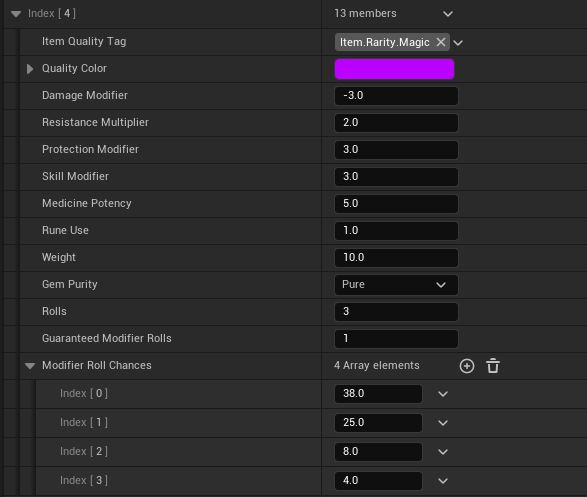
Quality Item.Rarity.Magic
Guaranteed modifiers 1
Additional chances 38% / 25% / 8% / 4%
Damage bonus +3
Resistance multiplier ×2
Number of rolls 3
The generator therefore starts with the guaranteed modifier. It then makes a 38% roll to add another, followed by a 25% roll only if the first succeeds, and so on. The sequence stops as soon as a roll fails: failing the 25% roll, for example, prevents the 8% and 4% rolls. This decreasing progression naturally limits modifiers while leaving a chance for exceptional items.
Example: a bonded magic weapon
This example illustrates one possible result. At a location where weapons may appear, the draw selects a melee weapon, then a quality that grants at least one modifier roll. The compatible pool offers the Item.Modifier.Bonded tag, so the matching fragment completes the weapon with its bond properties.
1. Context
Generation location
LocationTag
→
2. Weighted draw
Item type
Item.Type.Weapon.Melee.Blade
→
3. Base data
Weapon Fragment
Damage, resistance, range, weight
→
4. Rarity
Drawn quality
Colour, bonuses, and number of rolls
→
5. Modifier
Bonded Fragment
Item.Modifier.Bonded
→
6. Final instance
Bonded magic weapon
Fragments + tags + total weight
The WeaponFragment applies the base values and quality adjustments. A Bonded fragment means that the item is bound to its bearer: it can return within reach at a defined distance, and its user can sense its presence at a configured range. These fragments are kept together in GeneratedItemInstance, which provides the item's complete representation.
// The weapon fragment applies the base data and quality.
TotalDamage = FMath::Max(1, BaseDamage + ItemQualityData.DamageModifier);
TotalResistance = BaseResistance * ItemQualityData.ResistanceMultiplier;

// The Bonded modifier adds its specialised properties.
BondReturnDistance = BondedBaseData.BondReturnDistance;
BondPresenceDetectionDistance = BondedBaseData.BondPresenceDetectionDistance;
Definition example: longsword
This Data Asset entry describes a longsword before it is generated. Its Gameplay Tag Item.Type.Weapon.Melee.Blade.LongSword lets the generator identify its category and instantiate the appropriate WeaponFragment. The listed statistics are the base values to which quality and modifiers can then be added.
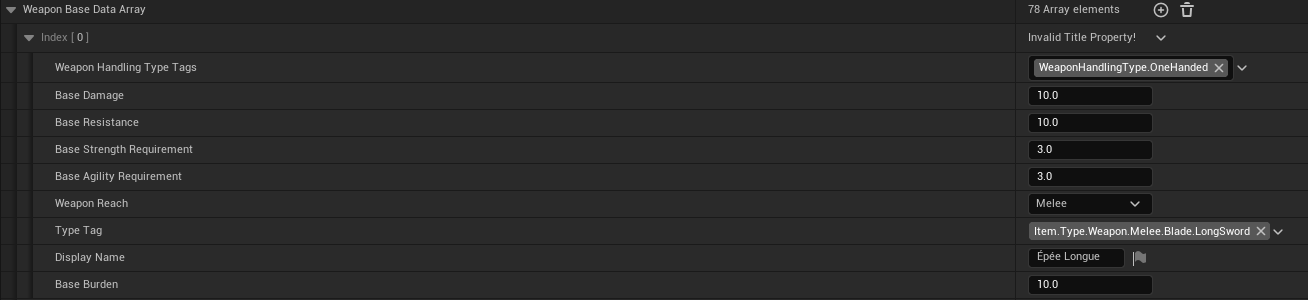
Type One-handed weapon
Base damage 10
Base resistance 10
Requirements Strength 3 / Agility 3
Range Melee
Base weight 10
Towards a visual item presentation
The project's goal is to make maximum use of Gameplay Tags to build a data-driven system that can be extended freely without multiplying special cases in code. The next step will give the generator a more visual dimension, with a loot-box-style animation and an interface dedicated to presenting obtained items. Eventually, every item will have its own 3D render and VFX determined by its properties, quality, and modifiers.